This post contains affiliate links. We may earn a small commission when you buy through our links — at no extra cost to you.
It’s midnight in a hotel room, your phone is at 4 percent, and the only free outlet is wedged behind the nightstand where nothing you packed will reach it. A travel power strip is the unglamorous fix: one wall socket becomes several AC outlets plus USB ports, so every device you brought can charge on the desk instead of the carpet.
I’ve carried one for years, and over six months my team and I ran 14 of them through real trips — hotel rooms, a cruise cabin, a dorm desk, a few airport gates. The details that separate them aren’t the outlet counts on the box. It’s the plug, since a flat angled one actually reaches the socket behind the bed, and the strips that wrap their cord around the body pack down without a tangle.
What you give up, usually, is reach, plus a little speed when everything is plugged in at once. The right pick comes down to whether it lives in a backpack or on a desk — and the keepers are below.
Our Top Picks


The Best Travel Power Strips, Reviewed
1. ORICO AP3 Travel Power Strip
Best Overall
Key Features
- Cord: 4 ft, wrap-around
- Plug: 0.39 in flat, 45°
- Surge protection: No surge protection
- Outlets and ports: 4 AC + 3 USB (1 USB-C)
- Price: Budget
Four AC outlets, three USB ports, and a cord that wraps around the body with the plug parking in one of the outlets: that combination is why the ORICO AP3 is the strip we recommend first. It is a palm-sized block that drops into a shoe, and the 4-foot cord coils into a channel with a rubber strap holding it closed, so nothing unspools into a bag between trips.
What sold us is the outlet count. Most strips this small give you two or three AC sockets; this one gives you four, alongside two USB-A and one USB-C. In a hotel room with a single wall plate, that is a laptop, two phones, a camera, and a watch charging from one spot. The 45-degree, 0.39-inch flat plug lets the strip sit on the floor behind a nightstand instead of dangling from the plate, and the whole thing is ETL listed with no surge protection, which is the configuration cruise lines’ rules are written around.
Two things we noticed once it was loaded up. The outlets sit in a single row on one face, so a chunky camera brick can cover the socket beside it — leave a gap when you plan the load. And the 4-foot cord, generous at a desk, can come up short when the only free outlet is across a cabin; that is the price of a cord that packs this small. If you need laptop-speed charging from USB-C, the Anker below is the reason this one is not your pick.
Pros
- Four AC outlets in a palm-sized body
- Cord wraps into the body and the plug parks
- Flat 0.39-inch plug fits behind furniture
- No surge protection suits cruise rules
Cons
- 4-foot cord falls short of far outlets
- A wide adapter can cover the next outlet
Buy this one first: four AC outlets, three USB ports, and a cord that wraps and stows in a body small enough to forget.
2. Anker Nano 67W Charging Station
Best for Laptop Trips
Key Features
- Cord: 5 ft, fixed
- Weight: 13.9 oz
- USB-C output: 67W max
- Outlets and ports: 2 AC + 4 USB (2 USB-C)
- Price: Midrange
Two AC outlets instead of four sounds like a downgrade until you look at the USB side: a single 67-watt USB-C port, enough to charge a 13-inch MacBook Pro in roughly the time its own charger takes. At 0.75 inches thick, with a 5-foot cord and a 0.35-inch flat plug, the Nano is the strip for someone whose bag already contains a computer.
What we appreciated most is that it retires two pieces of gear at once — the laptop charger and the travel strip. Anker’s own figure puts a 13-inch MacBook Pro at about an hour and fifty-four minutes, and the two AC sockets still take a lamp, a camera charger, or whatever the room throws at you. The catch is that 67 watts is the strip’s whole budget rather than a per-port allowance, so the laptop charges fastest when it is the only thing on USB-C. Four USB ports and two outlets also fill up quickly with a family in one room.
Weight is the other trade. At 13.9 ounces it is a real lump in a personal item — about two phones’ worth — and on a desk between trips that does not matter, while through three airports it does. Anker backs it with a 24-month warranty and a connected-equipment guarantee, which is the most coverage in this group. For a carry-on-only trip with no computer, the ORICO packs smaller and gives up the fast USB-C to get there.
Pros
- 67W USB-C charges a laptop directly
- Slim 0.75-inch body with a flat plug
- Long 24-month warranty and equipment coverage
Cons
- 13.9 ounces is noticeable in a small bag
- Only two AC outlets
The one to pack if a laptop comes along: 67 watts of USB-C replaces the brick, and two AC outlets cover the rest.
3. One Beat Flat Plug Power Strip
Best Budget
Key Features
- Cord: 6 ft braided, fixed
- USB-C output: 15W (5V/3A)
- Surge protection: No surge protection
- Outlets and ports: 3 AC + 4 USB (2 USB-C)
- Price: Budget
Six feet of braided cord is the reason to look at this one. Hotel rooms are laid out so the only free outlet is behind the desk, and a wrap-around strip with 2 feet of cord leaves your phone charging on the carpet; the One Beat reaches the nightstand.
The rest is a standard seven-in-one: three AC outlets and four USB, two of them USB-C. Read the fine print on those. The USB-C ports are 5V/3A, which is 15 watts — a phone port wearing a USB-C connector. Anyone who assumed USB-C meant laptop charging will be the person disappointed by this strip. The 0.35-inch 45-degree plug slides behind furniture, the housing is polycarbonate, and it is ETL and FCC listed with no surge protection, which is what most cruise rules ask for.
At the bottom of this group’s price range, it is the strip we point people to when they want a spare rather than a centerpiece. Longevity is the caveat: units that work fine and then quit inside a year are the pattern here, so the 12-month warranty is the window that counts. Buy it as the second strip, and let the good one stay plugged in at home.
Pros
- 6-foot braided cord reaches distant outlets
- Seven ports at a very low price
- ETL listed with no surge protection
Cons
- USB-C ports top out at 15W
- Longevity is the weak point
Buy it as the spare that lives in a suitcase: six feet of cord, seven ports, and a price that makes losing it painless.
4. Anker Prime 140W Charging Station
Best for Power-Hungry Kits
Key Features
- Cord: 5 ft, detachable
- Packed size: 6.38 × 3.11 × 0.71 in
- USB-C output: 140W max
- Outlets and ports: 2 AC + 4 USB (2 USB-C)
- Price: Premium
This is the one to buy if your kit includes a laptop, a camera, and a phone that all want to charge at once. A single USB-C port delivers 140 watts — enough to run a 14-inch laptop at speed while the other three USB ports handle the small stuff — and the display shows what each device is actually pulling, which we found genuinely useful the first time something seemed to be charging slowly.
It is also the thinnest strip here at 0.71 inches, with a pop-up AC outlet that keeps the body flat and a 5-foot detachable cord. Detachable cuts both ways: the strip packs smaller and a damaged cord is a swap rather than a dead unit — except Anker does not sell replacement cords, so treat the one in the box as part of the product.
Two AC outlets is the ceiling, and this is the most expensive pick here by a wide margin. What the money buys is wattage and information: for a phone and a watch, the Anker Nano does the same job for about half. If your bag already carries a 140-watt laptop brick, this replaces the brick, the guesswork, and one more thing to lose.
Pros
- 140W from a single USB-C port
- Slim 0.71-inch body with a pop-up outlet
- Display shows live power draw per device
- Detachable 5-foot cord packs separately
Cons
- Two AC outlets only
- Anker sells no replacement cords
Worth it for a laptop-and-camera kit: 140 watts on one port, a live wattage readout, and the thinnest body here.
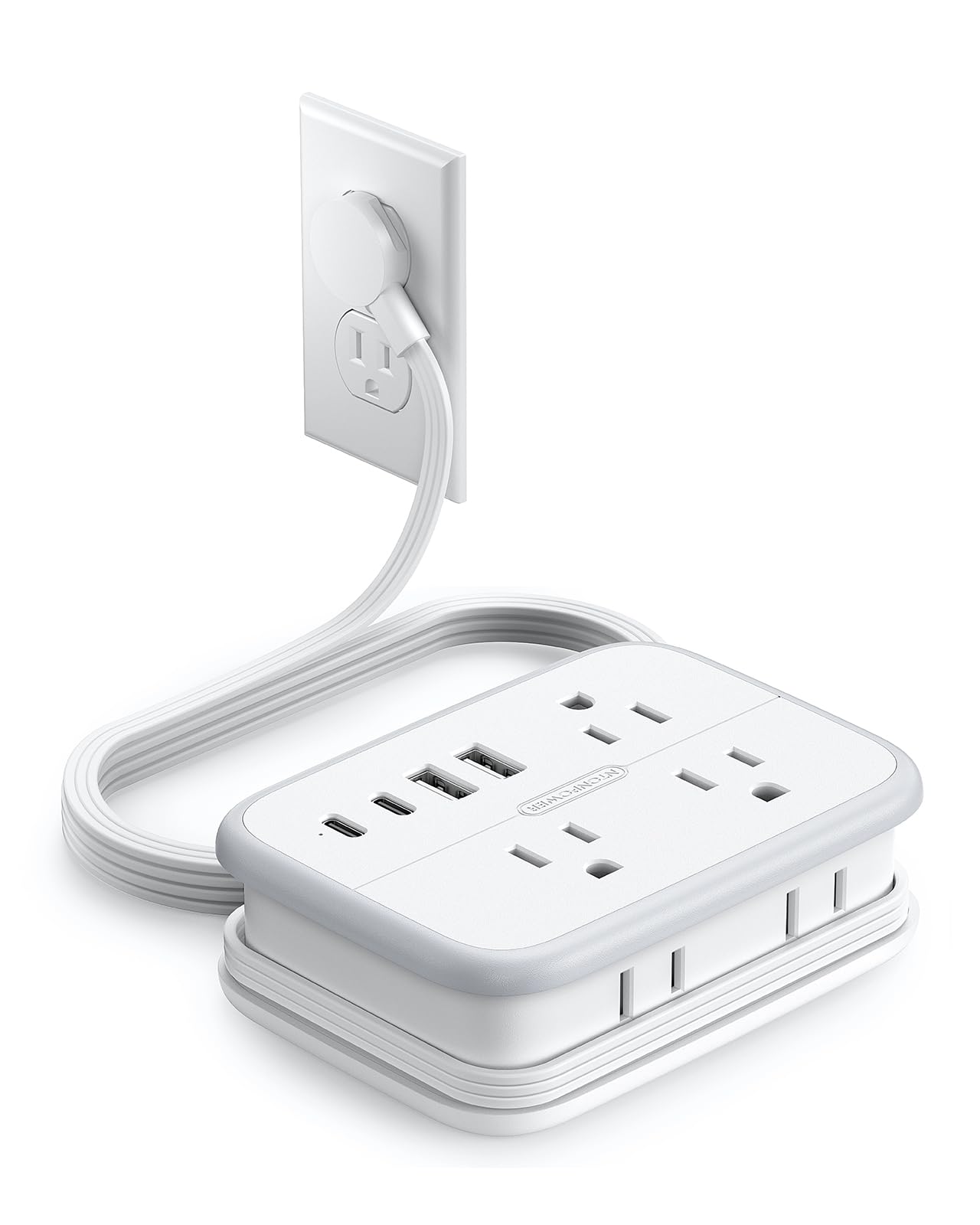
5. NTONPOWER 10-in-1 Travel Power Strip
Most Outlets
Key Features
- Cord: 4 ft, wrap-around
- Plug: 0.35 in flat
- Power rating: 1250W / 10A
- Outlets and ports: 6 AC + 4 USB (2 USB-C)
- Price: Budget
Six AC outlets is more than anything else on this list, and they are split across three faces rather than lined up in a row, so a chunky adapter on one side does not steal the socket beside it.
For a family sharing a cabin with one wall outlet, that is the pick: six AC plus two USB-C and two USB-A, a 4-foot cord that wraps and parks its plug, and a 0.35-inch flat head. We like that the outlets face different directions — it is the difference between four usable sockets and two when everyone brings a different brick. The 10-amp, 1250-watt rating covers laptops, cameras, and chargers, and not a hair dryer or a travel kettle.
The USB side is where it gives ground. Sockets that fail and a USB-C port that loosens are what to watch for here, and the USB-C output is not a laptop-grade figure, so plan on charging a computer from an AC outlet. It is also the largest of the wrap-around strips, which is fine in a suitcase and less fine in a daypack. Reserve it for the trip where the whole family’s gear lands on one nightstand.
Pros
- Six AC outlets on three faces
- Two USB-C ports plus two USB-A
- 4-foot cord wraps and parks its plug
Cons
- USB ports are the weak point
- Largest body of the wrap-around strips
The family-cabin answer: six AC outlets on three faces, four USB ports, and a cord that wraps into the body.
6. TESSAN 2-Ft Wrap-Around Power Strip
Best for Minimal Packing

Key Features
- Cord: 2 ft, wrap-around
- Plug: 0.35 in flat, 45°
- Weight: 6.63 oz
- Outlets and ports: 3 AC + 3 USB (1 USB-C)
- Price: Midrange
At 6.63 ounces, the TESSAN is the one you forget you packed. That is the whole argument for it: a body a little over three and a half inches square, a 0.35-inch angled flat plug, and a 2-foot cord that wraps around the housing with the plug parking in an outlet.
The port count is modest — three AC outlets, one USB-C at 15W, and two USB-A at 12W — and that is fine for a phone, a watch, and a tablet on a nightstand. Treat the USB-C as a phone port and nothing more; the shape is what you are buying, not the wattage. The 18-month warranty matches most of this group.
We prefer a wrapped 2 feet to a loose 6 in a daypack, and the square body sits flat on a narrow nightstand instead of hanging off the edge, which is exactly where hotel outlets put you. The limit is the cord: if the outlet is not within reach of the bed or the desk, this is the wrong strip and the One Beat’s 6 feet is the answer.
Pros
- 6.63 ounces packed
- 2-foot cord wraps and stores
- 0.35-inch flat plug and square footprint
Cons
- 2-foot cord is a hard limit
- USB-C is 15W max
Pack it when every ounce counts, as long as the outlet is within arm’s reach of where you want to sit.
7. POWSAF 4-Outlet Travel Power Strip
Backup Suitcase Strip

Key Features
- Cord: 4 ft, wrap-around
- USB output: 3A total, shared
- Surge protection: No surge protection
- Outlets and ports: 4 AC + 3 USB (2 USB-C)
- Price: Budget
If the strip is going to live in a suitcase and come out three or four times a year, this is the one to buy. It is the least expensive route here to four AC outlets and two USB-C ports, the housing is ETL listed, and nothing about it looks improvised.
The cord is the part POWSAF got right: 4 feet wrapped around a circular channel in the housing, the plug parking in an outlet when it is packed, and a 0.35-inch head angled at 45 degrees. There is no surge protection, which is the version most cruise lines’ rules are written around — though a strip with a cord is refused outright by some lines no matter what is inside, so check the list for your ship before it goes in the bag.
Three USB ports share a 3-amp budget, and that is the number that matters. Two phones charging overnight is realistic; two phones and a tablet at once will be slow. Expect the USB-C ports to top up phones rather than to run a laptop off them.
That is a fair trade at this price. The wrap is tidy, the flat plug works behind a dresser, and if the strip is lost, left behind, or refused at the pier, the loss is small. Buy it as the second strip so the good one can stay plugged in at home.
Pros
- Four AC plus two USB-C at the lowest price
- 4-foot wrap-around cord with flat plug
- ETL listed with no surge protection
Cons
- All three USB ports share 3A
The suitcase spare: four AC outlets and two USB-C ports at the bottom of the price range, with slow shared USB.
8. NTONPOWER GaN 65W Charging Station
Best for Usb-C Laptop Travel

Key Features
- Cord: 4 ft, wrap-around
- USB-C output: 65W max
- AC outlet types: 1 three-prong, 2 two-prong
- Outlets and ports: 3 AC + 4 USB (2 USB-C)
- Price: Midrange
A cube rather than a slab: the NTONPOWER GaN puts three AC outlets and four USB ports into a body 4.3 inches long and 2.3 wide, with a 4-foot cord that wraps around it and a plug that parks for storage.
The detail that decides whether it works for you is the outlets. Only one of the three AC sockets takes a three-prong plug; the other two are two-prong only. A laptop with a grounded cord goes in the single Type B socket, and that is the end of that.
Power sharing is the other thing to plan around. One USB-C port alone gives 65 watts; a laptop plus a phone splits into 45 and 20; with everything plugged in, the laptop drops to 45 while the other three ports share 15. Charge the computer first and add devices after, and the numbers stay where you expect them.
For a USB-C laptop and a phone, 65 watts of GaN charging in a body this small is a genuinely good trade, and we think it justifies the premium over the ORICO if you are not carrying a laptop brick. What holds it back is consistency: some devices do not draw the power they expect from it, so buy it for the fast port and pair it with a cable you trust.
Pros
- 65W USB-C in a small cube
- 4-foot cord wraps into the body
- Seven ports in total
Cons
- Only one three-prong AC outlet
- Power drops when ports are shared
The USB-C laptop pick when you want one cable and 65 watts: buy it for the fast port, not for the outlet count.
How We Tested Travel Power Strips
We started by collecting every travel-oriented strip we could find and cutting the ones that were too bulky for a carry-on, vague about surge protection, or short on USB-C. That left 14 units, and each one went into rotation for six months.
In practice that meant hotel rooms with one reachable outlet, a cruise cabin, a dorm desk, and a run of airport gates. We charged a laptop, two phones, a camera, and a watch at once and noted which ports slowed under that load, timing how long a half-drained phone took to hit 50 percent with a laptop drawing on the AC side.
Every strip was weighed on a kitchen scale, then packed and unpacked the way you actually would — cord wrapped around the body, dropped in next to a laptop — to see whether the wrap held and whether anything snagged. We plugged each flat plug into a loose outlet behind a couch and gave the cord a tug to check it stayed seated, then watched the joint where the cord meets the housing for fraying across the six months.
Power output got its own pass. We compared the rated wattage against what the ports actually delivered with several devices connected, since splitting a small budget across six ports isn’t the same as fast-charging a laptop from one. Then we set what each strip does against what it costs and how much room it takes up in a bag.
How to Choose a Travel Power Strip
Three things decide a travel strip before port count ever comes up: how it packs, whether it reaches the outlet, and whether the ship or the airline will let it through.
Outlets first, ports second
USB-C on a strip is not a promise of laptop charging. The ports in this group run from 15-watt phone chargers to a 140-watt GaN port, and the label looks identical from the outside. If a computer is coming with you, either buy a strip with a 45W-or-higher USB-C port — the two Ankers and the NTONPOWER GaN cube qualify — or accept that the laptop’s own brick needs one of the AC sockets.
Then count AC sockets against the number of people. Two covers a couple with phones and a tablet. Four is the number that stops an argument once cameras, watches, and a laptop are in the bag. Six, as on the NTONPOWER 10-in-1, is for a family sharing one cabin outlet.
Cord length, plug thickness, and packed size
The wrap-around cord is the best idea in this category and also its limit. Wrapped strips here carry 2 to 4 feet, which is plenty from a nightstand outlet and useless when the only free socket sits across the room. A fixed 5- or 6-foot cord reaches anywhere and travels as a coil instead, which is the trade the Ankers and the One Beat make.
The plug matters as much as the cord. Flat heads here run 0.35 to 0.39 inches and angle 45 degrees, which is what lets the strip sit behind a nightstand instead of hanging off the wall plate. On bulk, the range runs from just over 6 ounces on the TESSAN to about a pound on the Anker Prime: the light ones disappear into a daypack, the heavy ones stay put on a slick desk.
Surge protection and cruise rules
Every cruise line publishes a prohibited-items list, and power strips appear on most of them in some form. The version that most often passes is a strip with no surge protection, because the concern is the suppressor’s components rather than the outlets themselves. The ORICO, One Beat, POWSAF, and both NTONPOWER strips here are built without surge protection.
That does not make them approved. Lines differ, and some refuse anything with a cord no matter what is inside. Check the list for your specific line and ship before you sail, and treat "cruise approved" in a product title as marketing rather than permission.
Power sharing and the load ceiling
A multi-port charging station divides one budget. A 65W unit typically gives a single USB-C port the full 65, splits to 45 and 20 when a second port is used, and hands the leftovers to everything else once all ports are full. Plug the hungriest device in first and add the rest afterward, or the laptop will trickle all evening.
AC output has a ceiling too: 10 amps and 1250 watts on most of these, which handles laptops, cameras, and chargers and not a hair dryer or a travel kettle. Those belong in a wall socket rated for them, and ships often ban them outright.
Frequently Asked Questions
Do I need a voltage converter to use a travel power strip abroad?
An adapter changes the shape of the pins; it does not change the voltage. These are 125-volt North American strips, and feeding one from a 230-volt socket through a plug adapter can damage the strip and anything attached to it — including devices on the USB ports, since the strip’s own electronics do the converting.
Read the label on the strip. If it says 125V only, leave it home and pack a dual-voltage charger; if it states 100-240V, an adapter is all you need.
Can you take a power strip in a carry-on bag?
Security rules allow power strips in both carry-on and checked baggage, so the airport is rarely the obstacle. The real risk is a cruise line’s prohibited-items list, or a country that restricts extension cords in luggage.
Pack it in the top layer of the bag so it can be pulled out and looked at without unpacking everything, and screenshot your line’s rules before you leave.
Is a travel power strip worth it if hotels already have USB outlets?
Usually yes. The USB outlet built into a lamp or bedside panel is often a single low-power port, and it is frequently the only one in the room. A strip gives you AC sockets as well, which is what a laptop brick, a camera charger, and a curling iron need.
If you travel with one phone and nothing else, skip the strip and pack a small dual-port charger instead.
Final Verdict
The ORICO AP3 is what we hand someone packing for a week away: four AC outlets, three USB ports, a 4-foot cord that wraps into the body with the plug parked in an outlet, and a flat head that fits behind a hotel nightstand, all in something you can drop in a shoe. It is the most useful strip here per dollar and per inch.
If a laptop rides in your bag, the Anker Nano 67W is the better buy — you give up two AC outlets and gain a 67-watt USB-C port that retires the laptop brick. For a kit with a high-wattage laptop and camera gear, the Anker Prime‘s 140 watts and live readout justify the jump.