This post contains affiliate links. We may earn a small commission when you buy through our links — at no extra cost to you.
The worst place to lose a power strip is a cruise terminal security line. Surge protectors sit on nearly every major line’s prohibited list, and screeners recognize them on sight. What actually clears is a non-surge strip: plain outlets and USB ports, no surge circuitry, nothing that argues with the ship’s electrical system.
That’s the first filter I apply, and it’s why a cheap strip can beat a pricey one. My team has spent four months living with 14 of them across two sailings, a stack of hotel rooms, and a guest-room desk I set up to match a cabin’s. Footprint surprised me — a cabin desk has about a foot of usable space once the ice bucket and the next day’s newsletter land on it.
Cord length is the quieter trap. Each line sets its own limit, several around the few-feet mark, so the six-footer from your home office may not sail. Everything below is non-surge with a short wrapped cord, and we’ve noted port mix and plug orientation so you can match one to your cabin’s outlets.
Our Top Picks



The Best Cruise-Approved Power Strips, Reviewed
1. Cruise On 3 AC / 2 USB
Best Overall
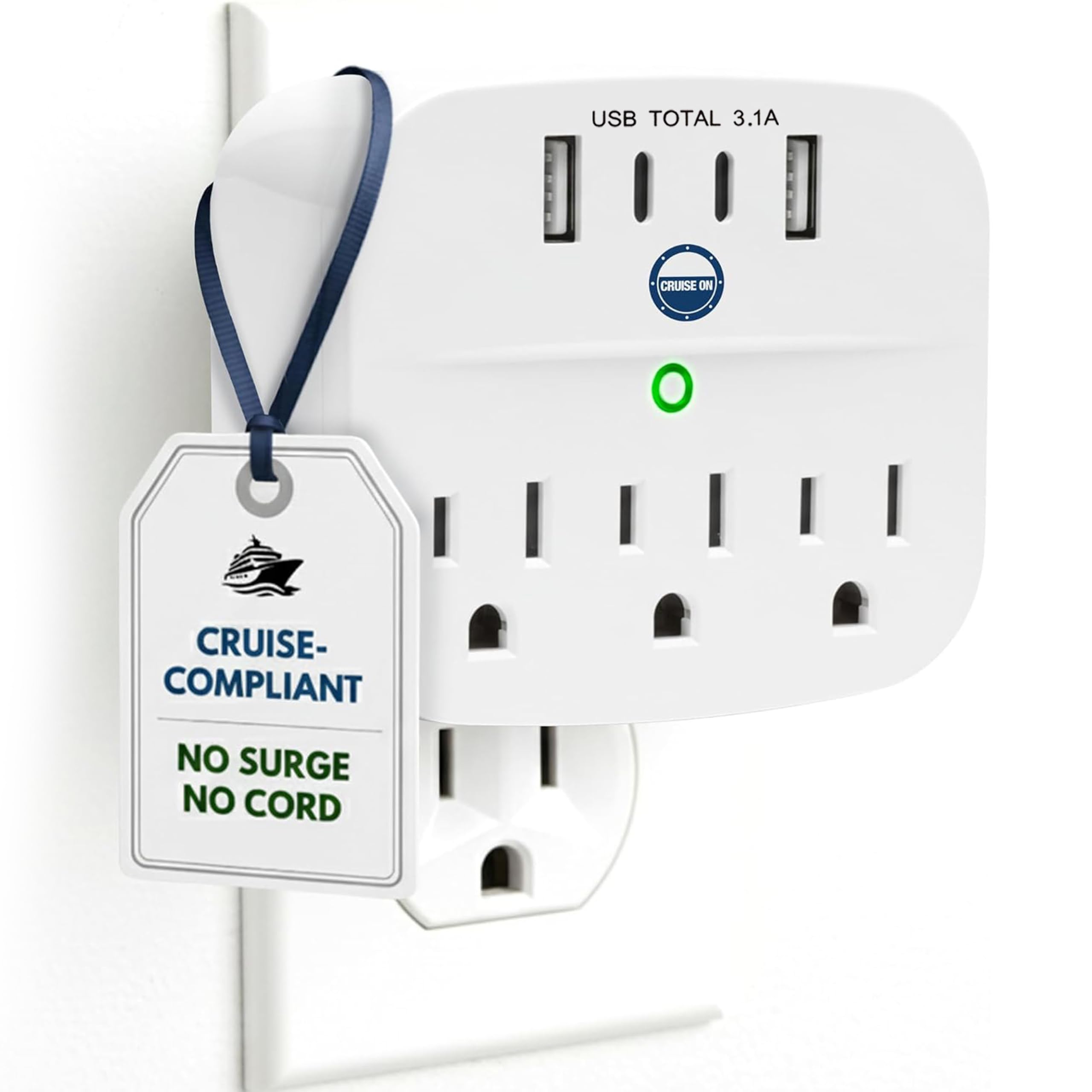
The most useful thing about the Cruise On 3 AC / 2 USB is what it leaves out: there is no extension cord. That matters at embarkation, where a loose cord is the first thing a security screener sees. The body is only 3.5 by 3 inches and 5 ounces, so it disappears into a packing cube, and it turns one cabin outlet into three AC outlets and two USB ports.
We recommend it as the default because it pairs the least provocative shape with the clearest line list in this group. The maker lists it for Carnival, Celebrity, Princess, Norwegian, Holland America, MSC and Virgin Voyages, and explicitly excludes Royal Caribbean. That is not a technicality: if you are sailing Royal Caribbean, this is not the pick. For everyone else, five-device capacity covers two phones, a watch, a camera battery and a tablet without a tangle of adapters.
The no-fuss handoff is what we appreciate. There is no cord to wrap, no plug to orient and no spare cable to lose in a drawer. It suits a couple charging phones, watches and a camera, and it is small enough to leave in the bag between trips. The USB ports are fine for phones and e-readers.
Reach is the trade-off. If the only outlet is behind the bed and you want the strip on the nightstand, a cordless block will not get you there; the corded picks below are for that cabin. Otherwise, this is the one we reach for first.
Pros
- No cord to draw extra scrutiny
- Three AC outlets plus two USB ports
- Compact 5-ounce body
- Explicit line list for major cruises
Cons
- No USB-C ports
We recommend the Cruise On to most cruisers because its no-cord, non-surge design is the least likely to draw a security question—just confirm your line does not exclude it.
2. Cruise On 3 AC / 4 USB
Best for Usb-C Devices
Key Features
- USB ports: 2 USB-C, 2 USB-A
- AC outlets: 3
- Device capacity: 7 devices
- Price: Midrange
Two USB-C ports and two USB-A ports are the reason to look at this Cruise On model. The five-device original is simpler, but this one has a seven-device layout that better matches a modern cabin: two phones, two tablets, a watch and a camera can all stay plugged in. We pick it for USB-C households because the cordless body still travels like the top pick, with no cable to wrap.
The maker lists it for Carnival, Celebrity, Princess, Norwegian, Holland America, MSC and Virgin Voyages, and warns that some Disney and Royal Caribbean ships may not allow it. That warning matters. A non-surge strip is not a universal pass, and a line list is only as good as the ship you are actually sailing.
The USB ports are charging ports, not a laptop dock. Total USB output is 15.5W, so a phone or tablet will charge, but a MacBook needs its own power adapter. We also like that the outlets and ports sit in one compact block; there is no cord to manage and no separate charger to forget.
The extra ports are the whole story; the rest of the design is deliberately boring, which is what you want at a cruise terminal.
Pros
- Two USB-C and two USB-A ports
- Seven-device capacity without a cord
- Compact cordless body
- Clear line list with caveats
Cons
- No cord to reach a distant outlet
If your cabin has more USB-C devices than plain outlets, this is the Cruise On we point you to; it adds two USB-C ports without adding a cord.
3. ORICO 4 AC Travel Strip
Best for Families
Key Features
- Cord: 4 ft wrap-around
- Size: 4.33 x 2.5 x 1.6 in
- USB ports: 1 USB-C, 2 USB-A
- AC outlets: 4
- Price: Midrange
Four AC outlets are the rare part. Most cruise-friendly strips stop at three, which is fine until you are traveling with a family that needs two laptop chargers, a camera charger and a fan. The ORICO adds a fourth outlet plus two USB-A and one USB-C port, and the whole thing is smaller than a phone.
The 4-foot cord wraps around the body, so it packs without a separate pouch, and the 45-degree flat plug can sit behind a nightstand. The listing calls it cruise-ship approved and non-surge, but it does not name specific lines. That is the catch: check your line’s policy before you count on it. The compact body is easy to place on a desk or dresser.
The outlet layout is not perfect for every adapter. Bulky power bricks can crowd the neighboring socket, so plan the order you plug things in. The USB-C port is handy for a phone, not a laptop. Still, for the family that needs more AC outlets than USB ports, this is the most useful shape in the group.
We like the fourth outlet because it is not a gimmick. It is the difference between a tidy charging corner and a rotation of plugs, especially when someone is traveling with a laptop, a camera and a fan. If everyone in your cabin carries only a phone and a tablet, the extra AC outlets will go unused; the top pick is smaller and simpler.
Pros
- Four AC outlets, rare in this group
- Compact body smaller than a phone
- Four-foot cord wraps around body
- Flat 45-degree plug
Cons
- Bulky adapters can crowd neighbors
For a family charging several AC devices, we pick the ORICO because four outlets are rare in this compact, non-surge format.
4. Mifaso Cruise Power Strip
Best Budget
Key Features
- Cord: 5 ft flat
- USB ports: 2 USB-C, 2 USB-A
- AC outlets: 3
- Power rating: 1875W / 125V / 13A
- Price: Budget
The Mifaso is the lowest-priced way to get seven charging points here, and it does not look or feel like a bare-bones strip. You get three AC outlets, two USB-C and two USB-A ports, a 5-foot flat cord and a right-angle plug that can sit behind a nightstand.
We see it as the budget pick for a couple or a small family, not for someone who needs line-specific reassurance. The listing identifies it as non-surge and cruise-ready, but it does not publish a list of accepted cruise lines. That is not a dealbreaker, but it means you should confirm your line’s rule before boarding. The flat cord is the practical win: it reaches an outlet behind the bed without a bulky coil.
The USB-C ports are 15W total, so they are for phones and tablets, not a laptop. Those are small trade-offs at this price. If you want the least expensive way to turn one outlet into a charging station, this is it; if you want the most widely accepted shape, the Cruise On is the safer bet.
The flat cord does more for daily use than the extra ports; it is the part you notice when the outlet is behind the bed.
Pros
- Seven charging points at budget price
- Five-foot flat cord with right-angle plug
- Non-surge for cruise cabins
- Mounts with keyhole slots
Cons
- No cord wrap, so cable can loop loose
We see the Mifaso as the value pick: it delivers seven charging points and a flat five-foot cord for the least money in this group.
5. NTONPOWER Wrap-Around
Best Cord Management
Key Features
- Cord: 4 ft wrap-around
- Size: 4 x 4 x 0.9 in
- USB ports: 2 USB-C, 2 USB-A
- AC outlets: 3
- Price: Midrange
The cord on the NTONPOWER wraps around the body and tucks into a groove, so the whole strip packs like a thick coaster. That is the detail that makes it easy to live with: no loose loop, no Velcro strap to lose, no knot to undo at the hotel or in the cabin. It measures 4 by 4 by 0.9 inches and has a 4-foot flat cord.
Three AC outlets, two USB-C and two USB-A ports cover seven devices, and the 0.31-inch flat plug fits behind furniture. The listing identifies it as non-surge, which is the cruise requirement, but it does not name every accepted line. A corded strip is still more likely to get a second look than a cordless one, so check your line’s policy.
What we like most is the way the wrap turns a loose cord into part of the object. You can coil it after use without hunting for a bag, and the flat plug keeps the strip close to the wall. The outlet face is tight, though, so two chunky adapters may not sit side by side.
The wrap is the feature you notice every time you pack; the rest is standard, and standard is fine here.
Pros
- Cord wraps around the body
- Seven devices with two USB-C
- Compact 4 x 4 x 0.9 body
- 0.31-inch flat plug
Cons
- Cord can slip off the wrap in a bag
We like the NTONPOWER for travelers who want a cord that disappears into the body; the wrap-around design keeps a cabin bag tidy.
6. TESSAN 2-Ft Wrap
Best for Short Bedside Runs
Key Features
- Cord: 2 ft wrap-around
- Weight: 6.63 oz
- USB ports: 1 USB-C, 2 USB-A
- AC outlets: 3
- Price: Premium
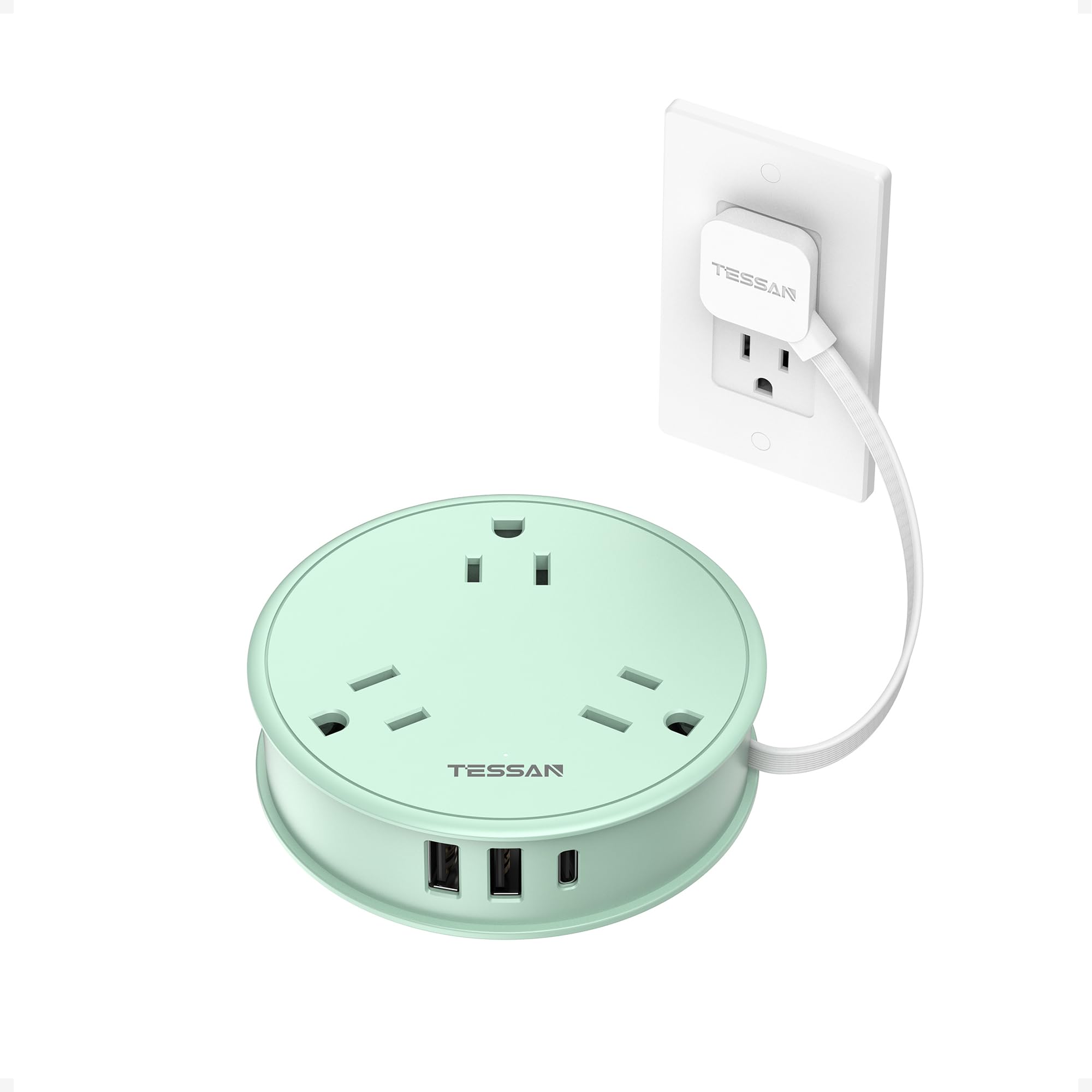
We think two feet is the right length for a cruise cabin more often than a six-foot cord. The TESSAN reaches from a bedside outlet to the small shelf beside it without leaving a loop of cable on the floor, and the cord wraps around the body when you pack. The flat plug is 0.35 inch thick, so it can sit behind the bed.
The size is the other win: three AC outlets, one USB-C and two USB-A ports in a 6.63-ounce body. That is light enough to keep in a carry-on and small enough for a nightstand. The layout is simple enough to use in a dim cabin, and the flat plug helps it sit close to the wall.
The listing calls it a cruise essential and identifies it as non-surge, but it does not list specific approved lines. Treat that as a check-before-you-pack item. For a solo traveler or a couple with a short run to the outlet, the compact shape is worth the premium; for a family, the ORICO or the top pick makes more sense.
The short cord also limits where the strip can go. If the outlet is across the cabin, this is not the one; the One Beat’s six-foot cord is the better reach. But for the common case of one outlet beside the bed and two people charging overnight, the TESSAN keeps the floor clear.
Pros
- Short two-foot cord keeps floor clear
- 0.35-inch flat plug
- Light 6.63-ounce body
- Six-device layout
Cons
- Only one USB-C port
The TESSAN is our short-cord specialist: two feet is enough to reach a bedside outlet without leaving a loop of cable underfoot.
7. One Beat 6-Ft Travel Strip
Long Outlet Reach

Key Features
- Cord: 6 ft braided
- Plug: 0.35 in flat
- USB ports: 2 USB-C, 2 USB-A
- AC outlets: 3
- Price: Budget
A six-foot braided cord is the reason to choose this One Beat strip. In a cabin where the only outlet is behind the headboard or across the room, the extra reach lets you keep the strip on the desk instead of kneeling on the floor to swap chargers. The flat plug is 0.35 inch thick, and the body has three AC outlets plus two USB-C and two USB-A ports.
It suits the traveler who needs reach more than the most conservative shape. The listing identifies it as non-surge and calls it a cruise accessory, but it does not name approved lines. A corded strip can still be refused at the terminal, so verify your line’s policy before you rely on it. The six-foot cord is also more cable to manage in a small cabin.
The rest is familiar: seven devices, a compact body, and USB-C ports that are fine for phones and tablets but not a laptop. The right-angle plug helps it sit close to the wall, and the cord is long enough to make a real difference when the outlet is badly placed.
We come back to it when reach is the problem and the cruise line is flexible. The six-foot cord is the whole reason to accept the extra bulk; without that need, the no-cord picks are cleaner.
Pros
- Six-foot braided cord reaches far outlets
- Seven charging points including two USB-C
- 0.35-inch flat plug
- Non-surge for cruise use
Cons
- Long-term durability is uneven
We recommend the One Beat when the outlet is across the cabin and you need a longer reach, provided your cruise line permits a corded non-surge strip.
How We Tested Cruise Power Strips
We started with roughly two dozen strips marketed as cruise-appropriate, then read the prohibited-items pages each major line publishes and cut anything with surge protection or a cord longer than those policies allow. Fourteen made it through, and we bought every one at retail so nothing arrived pre-picked by a brand.
Two came with me on actual sailings, a four-night and a seven-night; the rest spent their time on a desk built to mimic a cabin, with a two-outlet wall plate, a narrow shelf, and a lamp crowded onto it, plus a rotation of hotel rooms and a carry-on. First job on arrival was the plug test: I plugged each into the outlet nearest the bed and watched which direction the cord left the plug, whether it blocked the second socket, and whether the plug sat flush enough to slide a suitcase past.
Then we loaded them up — a phone, a tablet, a camera battery, and a watch on the same strip — and noted whether the USB-C port actually moved a phone’s charge or merely held it steady, and whether the housing got warm to the touch. Outlets took a tug test with a cord plugged in, to see if the contacts grabbed or let the plug sag. We traced each footprint against a paperback to see how much desk it ate, then weighed it packed, cord wrapped, in a bag.
Durability was the least polite part: every strip rode in a carry-on for a week, got dumped on a floor, and had its cord bent hard at the strain relief a few dozen times to check whether the jacket held.
How to Choose a Cruise-Approved Power Strip
The first useful question is not how many outlets a strip has; it is whether the strip is non-surge and whether your cruise line will actually let it aboard.
Non-Surge Is the Entry Ticket, Not a Guarantee
Cruise lines restrict power strips with surge protectors because the components can overheat or interfere with ship systems. A non-surge strip is the right starting point, but the words cruise approved on a listing are not a fleet-wide pass. Policies vary by line, ship and even port. The Cruise On models are the most explicit here, with line lists that call out Royal Caribbean as an exception. If your sailing is not named, email the line or check its current prohibited-items page before you pack.
Cordless First, Corded When You Need Reach
Cordless blocks are the least likely to draw a second look and the easiest to pack. They also need an outlet you can reach. If the cabin’s only outlet is behind the bed, a 2- to 4-foot cord is usually enough; six feet adds reach but also bulk and a cable to manage. Wrapped-cord designs such as the NTONPOWER and TESSAN keep that cable contained. If you choose a corded strip, expect more scrutiny at security and have your line’s policy handy.
Match the Port Mix to Your Devices
Three AC outlets plus two USB-A ports is plenty for two phones, a watch and a camera. Families with tablets, laptops or a CPAP should count AC outlets first, then USB ports. Two USB-C ports are useful for newer phones and tablets, but check the wattage: 15W to 15.5W is phone speed, not laptop speed. A laptop needs its own USB-C power adapter. The ORICO’s four AC outlets are the exception in this group, and that is why it suits families.
Pack for the Outlet, Not the Catalog Photo
Check the plug’s thickness and the strip’s footprint before you buy. A 0.35-inch flat plug can sit behind a nightstand; a thick plug can keep the furniture off the wall. Also think about outlet spacing: bulky camera or laptop adapters can cover a neighboring socket. A 5-ounce block disappears into a packing cube; a corded strip needs a pouch or a wrap. The best cruise power strip is the one you can place where you need it without unpacking half the cabin.
Frequently Asked Questions
Can I plug a hair dryer or curling iron into a cruise power strip?
Usually no. High-wattage heat tools are commonly banned in cabins and can trip the circuit even if the strip is rated for the load. The strip’s rating is a ceiling, not permission from the cruise line. Use the cabin’s supplied hair dryer or check with guest services before plugging in a personal appliance.
Will these power strips work in European or British cabin outlets?
No. Every pick here has a North American Type B plug and is rated for 125 volts. A plug adapter changes the shape of the pins, not the voltage. If your cabin has only a 220-240V European outlet, use a dual-voltage charger or a properly rated converter for your device; do not plug a 125V strip into it.
Do I need a power strip if my cabin has USB outlets?
If the cabin’s USB ports are enough for phones and watches, no. A strip earns its space when you need AC outlets for a laptop, camera charger, fan or medical device, or when several people are charging at once. Count the AC adapters in your bag first; if everything is USB-C, a multi-port charger is smaller and less likely to be questioned.
Final Verdict
We recommend the Cruise On 3 AC / 2 USB for most cruisers because its no-cord, non-surge shape is the least complicated thing to put in a cruise cabin, and its line list is unusually clear about where it is not accepted. If you need USB-C or more ports, the Cruise On 4-USB model is the direct upgrade. Families with several AC adapters should start with the ORICO and its four outlets. Whatever you choose, confirm your line’s current rule before you pack.