This post contains affiliate links. We may earn a small commission when you buy through our links — at no extra cost to you.
The outlet situation in most hotel rooms is a small betrayal: one free socket behind the nightstand and four devices in your bag that need it by morning. A travel charging station fixes that, turning a single wall outlet into enough ports for a phone, a watch, earbuds, and a laptop without making you unplug the lamp. I’ve done the suitcase-balance-and-hope routine on too many trips, and I’d rather not go back.
My team and I spent eight months testing 12 of these — folding magnetic stands and six-in-one strips with AC outlets alike — in hotel rooms, at airport gates, on a couple of cruises, and on my desk at home. Here’s what nobody tells a first-time buyer: many cruise lines ban surge-protected strips outright, so if you’re sailing, look for a listing that says no surge protection. Beyond that, port count and compact size matter more than the biggest wattage number on the box.
What follows is what actually survived: the ones that packed flat, charged fast, and didn’t add noticeable weight to a carry-on.
Our Top Picks



The Best Travel Charging Stations, Reviewed
1. Anker Nano 67W Power Strip
Best Overall
Key Features
- Size: 3.94 × 3.66 × 0.75 in
- Ports: 2 USB-C, 2 USB-A, 2 AC
- Weight: 13.9 oz
- Total output: 67W
- Price: Midrange
Two AC outlets and four USB ports is the mix that makes this Anker the one we reach for first. It covers the hotel-room problem a USB-only hub doesn’t: there’s a place for a laptop brick, a camera charger, or a hotel lamp, plus two USB-C and two USB-A ports for everything else. The 67W USB-C output is enough to top up a MacBook Air or most 13-inch laptops, and the flat plug sits close to the wall while the five-foot cord reaches an outlet behind the nightstand. We also like that the strip lies flat instead of balancing on a plug.
The size helps: 3.94 by 3.66 by 0.75 inches slips into a laptop bag, though at 13.9 ounces it’s not weightless. We found the outlet layout useful on a desk, too, because the strip doesn’t turn into a tower of adapters. The fixed five-foot cord is the main packing compromise. It wraps around the body for travel, but it can’t be detached and left behind, so it takes up a little more room than the Anker Prime 140W.
Charging speed is the trade-off to understand: 67W is shared, so a demanding laptop and several phones at once will each see less than the headline. The USB-A ports are fine for earbuds and older phones but slow for tablets. For a phone-and-laptop trip, though, this is the station we keep coming back to, and it’s the one we recommend before the heavier, pricier strips here.
Pros
- Combines two AC outlets with four USB ports
- 67W USB-C handles most travel laptops
- Flat plug and slim body fit tight outlets
- Five-foot cord reaches hotel-room outlets
Cons
- 67W is shared across six ports
- USB-A ports top out at 12W
For most travelers, we recommend this Anker: two AC outlets, four USB ports, and 67W laptop charging in a compact flat-plug strip.
2. Anker Prime 140W Charging Station
Best for High-Power Laptops
Key Features
- Ports: 2 USB-C, 2 USB-A, 2 AC
- Weight: 16.2 oz
- Display: Real-time wattage
- Total output: 140W
- Price: Premium
The 140W USB-C port is the reason to look here. A single port can carry a demanding laptop at full speed, and the two AC outlets mean you can still plug in a monitor, a camera charger, or a second laptop brick. The stacked design is only 0.7 inch thick, so it lies flat in a bag, and the pop-up outlet is a clever way to keep the top surface usable. It’s a travel strip for someone who works from a hotel room, not just someone charging a phone overnight.
We appreciate the detachable five-foot cord more than we expected. It lets us leave the cord in the bag when the outlet is close, and it makes the strip easier to pack than the fixed-cord models here. The live display is genuinely useful on a trip: it shows how much power each device is pulling, so you can see when a laptop is drawing the full 140W or when a phone has dropped to a trickle. At 16.2 ounces, it’s the heaviest pick in this group, but the weight buys real laptop power and two full outlets.
The catch is price and complexity. This is a premium station, and most phone-and-tablet travelers won’t use the display or the 140W ceiling. If your laptop charger is 65W or less, the Anker Nano 67W does the same job with less weight and cost. We still reach for this one when the laptop is the point of the trip, because the extra headroom means a full-size machine can charge at its own speed instead of sharing a smaller power budget.
Pros
- 140W USB-C charges demanding laptops
- Two AC outlets plus four USB ports
- Detachable cord packs easily
- Live display shows power draw
Cons
- Heaviest pick in this group
- Premium price for casual travelers
We see this 140W Anker Prime as the pick for 16-inch laptops and full desks of gear, with two AC outlets and a detachable cord.
3. Acer S3 3-in-1 Charging Station
Best Apple Travel Dock
Key Features
- Devices: iPhone, Apple Watch, AirPods
- Charging: 15W MagSafe-compatible
- Included: 27W USB-C adapter and cable
- Warranty: 2 years
- Price: Midrange
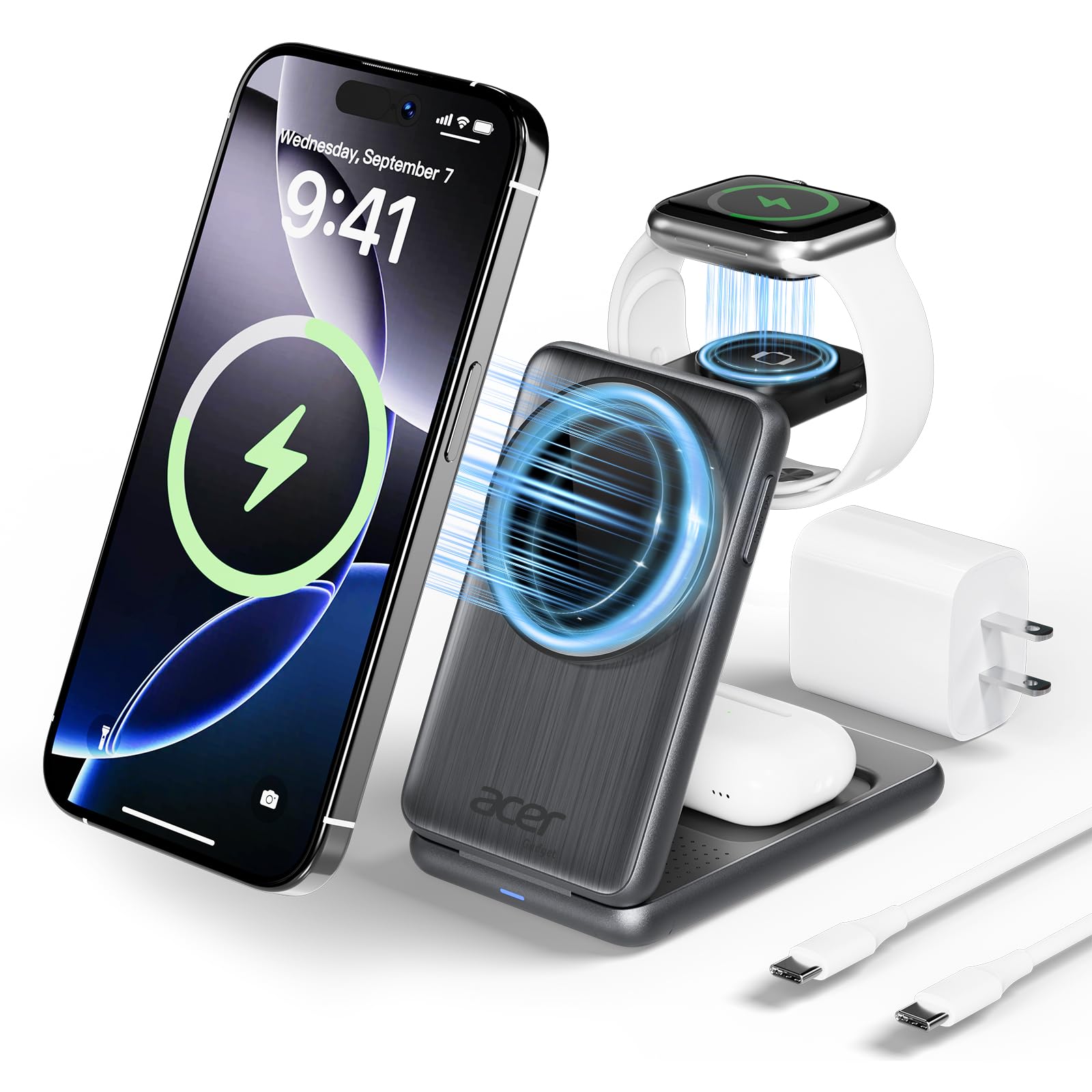
The Acer folds into a palm-sized block and opens into a three-device stand, which is exactly what we want on a hotel nightstand: the phone sits upright for alarms, the watch charger is right there, and the AirPods case has its own spot. It’s an Apple-only design, so Android phones and non-Apple watches are out, but for an iPhone-and-Watch traveler it replaces three cables and a wall adapter. The magnets are strong enough to hold a Pro Max phone through a case up to 2mm thick, and the non-slip base stays put when you lift the phone.
We were pleased that Acer includes a 27W USB-C adapter and a cable. That matters more than it sounds: a lot of these foldable docks are sold as bare pads, and the adapter is an extra thing to remember. The 15W MagSafe-compatible charging is not as fast as a wired USB-C charger, but it’s the right speed for overnight charging. The folded size is small enough to fit in a suitcase pocket, and the stand mode is stable enough for a bedside clock or a video call.
The limitation is the Apple-only ecosystem and the price compared with a bare budget dock. If you also carry a laptop, this won’t charge it; you’ll still need a USB-C brick or a power strip. For a short trip where the phone, watch, and earbuds are the whole kit, the folded size and included adapter make this the most complete Apple option here.
Pros
- Charges iPhone, Watch, and AirPods together
- Folds into a palm-sized block
- Includes 27W adapter and cable
- Strong magnets hold a Pro Max phone
Cons
- Apple devices only
- 15W wireless is slower than wired
We recommend this Acer for Apple-only trips: stable, fast enough, and sold with the adapter.
4. One Beat Flat Plug Power Strip
Best Budget
Key Features
- Cord: 6 ft flat plug
- Outlets: 3 AC
- USB ports: 2 USB-C, 2 USB-A
- Price: Budget
Three AC outlets and four USB ports for a very low price is the whole argument for this One Beat strip. It doesn’t try to be a premium travel hub; it tries to turn one awkward outlet into enough places to plug in a family’s phones, a tablet, and a couple of camera chargers. The six-foot braided cord and ultra-flat plug are the details that make it useful behind a hotel bed or a cruise cabin desk. It’s the one we hand to someone who mostly needs more outlets, not more watts.
We like that it has no surge protection, because cruise lines generally don’t allow surge-protected strips; that makes this one easy to keep in a cruise bag. The two USB-C ports are only 5V/3A, and the USB-A ports are 5V/2.4A, so this is not a laptop fast-charger. It will keep a phone, earbuds, or a tablet alive overnight, and the AC outlets handle the laptop’s own brick. That’s the right division of labor for a budget station.
The compromise is the USB side: it’s slow, and this isn’t the strip we reach for when a laptop needs a fast USB-C charge. But if you want to stop fighting over outlets in a hotel room or cruise cabin, this is the value pick here. It does the outlet job first and the charging-speed job second.
Pros
- Three AC outlets plus four USB ports
- Flat plug and six-foot cord reach awkward outlets
- No surge protection for cruise cabins
- Very affordable for the outlet count
Cons
- USB ports are slow for laptops
- Durability is uneven over the long term
We like the One Beat for budget hotel rooms and cruise cabins: three AC outlets, four USB ports, and a flat plug.
5. UGREEN 65W 5-Port Charging Station
Best for Usb-C-Only Packs

Key Features
- Cord: Removable
- Ports: 4 USB-C, 1 USB-A
- Total output: 65W
- Max single port: 45W USB-C
- Price: Budget
Four USB-C ports and one USB-A in a two-inch-tall block is a tidy answer for a USB-C-only travel kit. The UGREEN sits on a desk without taking over, has a non-slip base, and uses a removable power cord, so it packs smaller than a power strip with a fixed cord. It’s a desk charger that happens to travel well, and the four C ports mean you don’t have to ration the newer cables.
The 65W total is the number that matters, and it’s not the same as a 65W charger on every port. One USB-C port can deliver up to 45W, which is enough for a MacBook Air or a smaller laptop, but the total is shared. We found the charging performance mixed when several cables were plugged in: the first port does its rated 45W, while the other USB-C ports can drop to 5V. If you charge one laptop and one phone, it’s fine; if you expect four laptops to fast-charge, it isn’t.
That’s the trade-off: no AC outlets, and the total power is modest for a laptop-heavy group. For a solo traveler with a phone, tablet, and one laptop, the small footprint and four C ports are more useful than a bigger strip. We keep it as the compact alternative for a USB-C-only bag, not as a replacement for the top pick’s AC outlets.
Pros
- Four USB-C ports plus one USB-A
- 65W total with 45W on one port
- Removable cord and small footprint
- Non-slip base keeps it planted
Cons
- No AC outlets
- Extra ports slow down when shared
We see this compact UGREEN as the choice for a USB-C-only travel kit, as long as you understand the shared 65W.
6. KPON S28 3-in-1 Charging Station
Best for Budget Apple Setups
Key Features
- Devices: iPhone, Apple Watch, AirPods
- Charging: 15W MagSafe-compatible
- Included: Adapter and USB-C cable
- Warranty: 24 months
- Price: Budget
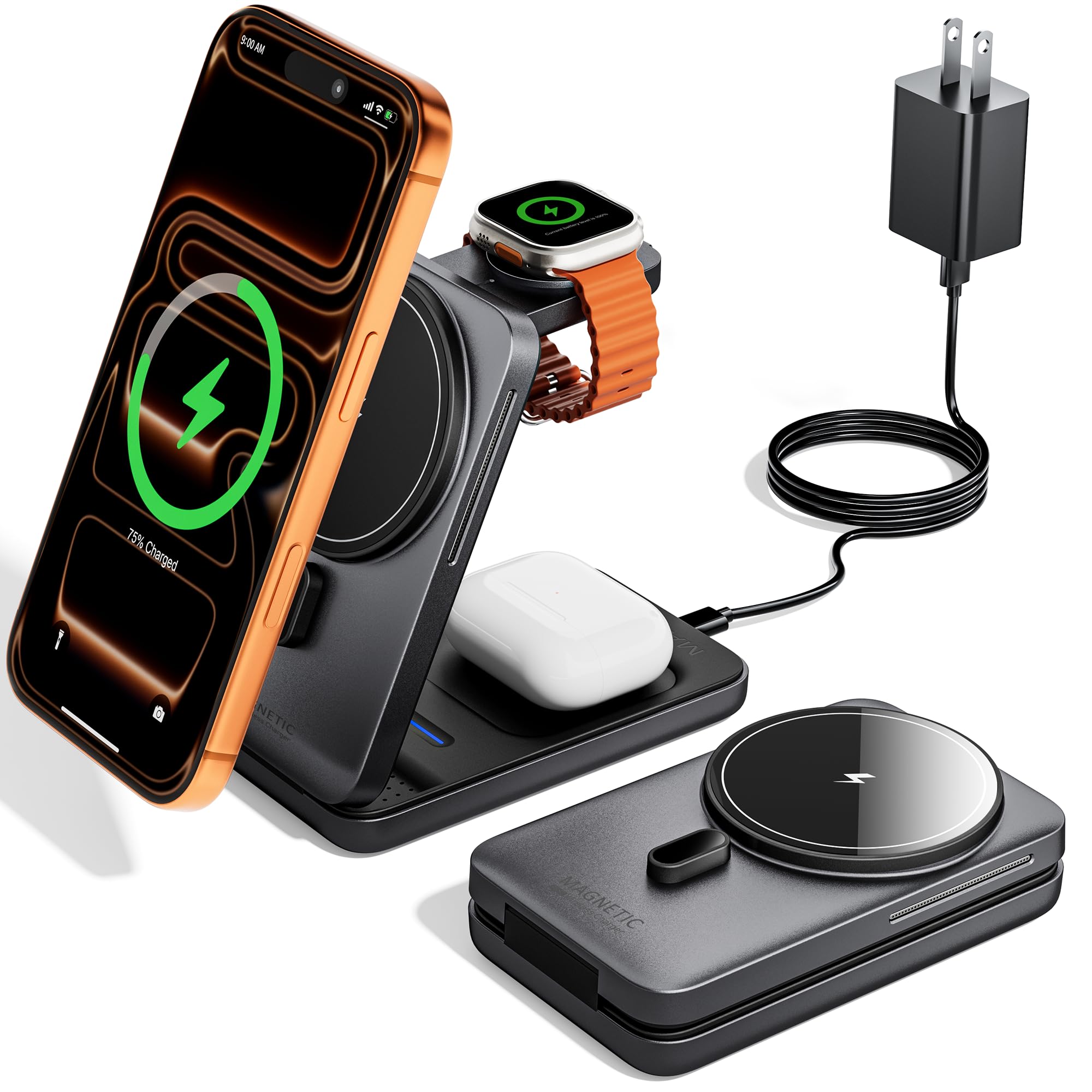
The KPON arrives as a complete kit: charging station, USB-C cable, adapter, and a 24-month warranty. That’s the practical difference between this and some cheaper foldable docks that leave you to supply the wall brick. It folds completely flat, has a strong N52 magnet for the phone, and holds an iPhone, Apple Watch, and AirPods at once without a tangle of cables. The light body makes it easy to pack, and the folded shape slides into a small compartment.
We like the stand mode for travel. The phone can sit upright for a bedside clock or a video call, and the watch and earbuds charge on their own pads. The 15W wireless charging is fine overnight, but it is not a fast wired charger; the listed time for an iPhone 15 Pro is about 2 hours and 23 minutes, which is a reminder that this is a convenience dock, not a speed demon. The magnet holds a phone securely.
The compromise is Apple-only compatibility and the slower wireless speed. If you carry a laptop, this won’t replace a USB-C brick, and it won’t charge an Android phone. For an iPhone-and-Watch traveler who wants one less cable and one less adapter to remember, the included adapter is the detail that makes it the easier budget buy than a bare dock.
Pros
- Includes adapter, cable, and 24-month warranty
- Folds completely flat for packing
- Strong N52 magnet holds phone securely
- Charges iPhone, Watch, and AirPods together
Cons
- Apple devices only
- 15W wireless charging is slow
This is the budget Apple dock we recommend when you want the adapter and cable included, not sold separately.
How We Tested Travel Charging Stations
We started by pulling every charging station with a real claim to portability — folding magnetic stands, palm-sized GaN blocks, and strips with a flat plug on a thin cord — then cut anything too bulky for a carry-on, too light on ports to replace a hotel outlet, or too expensive for what it did. That left 12 units, all bought at retail like anyone else would. Testing ran eight months, across roughly 30 trips between us.
In hotel rooms, we counted how many devices each one took at once while leaving the room’s other outlet free, and whether the plug blocked the second socket or hung loose in a worn wall plate. We charged a dead phone alongside a laptop, a watch, and earbuds, felt how warm the body got under that load, and timed the phone to half full.
Every unit went on a kitchen scale before and after packing, then into a backpack side pocket, a carry-on pouch, and a jacket pocket for the walk through the terminal and the wait at the gate. We dropped each from desk height onto a hard floor and checked for cracked housings, loose hinges, or a plug that no longer sat flush; folding stands were opened and closed a few dozen times to see whether the hinge stiffened or went slack.
On two cruises we used only the non-surge units in the cabin and left the rest home, which is how we learned how often that detail goes unlisted. Each one also spent a week on a desk, getting its cables yanked out one-handed.
How to Choose a Travel Charging Station
The right travel charging station is the one that matches the outlets, ports, and devices you actually carry, not the one with the biggest wattage.
Start with outlets, then ports
A USB-only hub is smaller, but two AC outlets often do more for a traveler because they let you use the laptop brick, camera charger, or hotel lamp you already carry. Count the devices that need power overnight, then count how many of them have their own brick. If the answer includes a laptop with a proprietary charger, prioritize AC outlets. If everything charges over USB-C, a four- or five-port hub saves bulk. Our default, the Anker Nano 67W, is the middle ground: two AC outlets, four USB ports, and enough USB-C power for a smaller laptop.
Match the wattage to your laptop
Total wattage is a shared budget, not a promise for every port. A 45W USB-C port is fine for a MacBook Air or a tablet, 65W covers most 13-inch laptops, and 100W to 140W is what a larger laptop needs when it’s working hard. If you charge a laptop and two phones at once, expect each device to see less than the headline. The Anker Prime 140W is the pick here for a 16-inch machine; the 67W Anker is the better fit for a smaller laptop and a phone.
Pack for the outlet, not just the bag
The best travel power strip is the one that fits the outlet you actually get. A flat plug helps behind a hotel bed, a five- or six-foot cord reaches the lamp outlet across the room, and a detachable cord is easier to pack but one more piece to lose. Weight matters too: 13.9 ounces is packable, while 16.2 ounces is noticeable but buys more power. Check the folded size against your bag and the outlet against the bedside table before you commit.
Know when a 3-in-1 Apple dock makes sense
A foldable 3-in-1 dock is the simplest nightstand solution for an iPhone, Apple Watch, and AirPods, but it is Apple-specific and slower than wired charging. The convenience is real: one adapter, one cable, and a phone that sits upright for alarms. The trap is assuming every dock includes the wall adapter; some do, some don’t. Check the box contents and the case thickness the magnets support. The Acer S3 is the one we recommend when you want the adapter included and a stable stand for a Pro Max phone.
Frequently Asked Questions
Can I use a travel charging station on a cruise ship?
Check for no surge protection. Cruise lines commonly prohibit surge-protected strips, and the One Beat strip here is explicitly no-surge, so it’s the one to pack for a cruise cabin. Even then, confirm your line’s current rule, and unplug the strip when you leave the cabin.
Do I need a voltage converter for a travel charging station?
Not if the charger is labeled for the local voltage. Look for an input range such as 100-240V; that means a plug adapter is usually enough. A single-voltage label means you need a converter. Check the label on the charger itself, not just the country you’re visiting.
Why pack a charging station instead of my phone’s charger?
A single phone charger is smaller, so a station only earns its space when you carry two or more devices. Count what needs power overnight: phone, watch, earbuds, tablet, laptop. If that number is three or more, one station with the right port mix saves outlets and cable hunting.
Can I put a folding charging station in a carry-on?
Yes. A folding charging station is a charger, not a power bank, so the usual airline power-bank limits don’t apply. Pack it in your carry-on if you want it accessible, and keep the adapter and cable with it so you’re not hunting for a USB-C brick at the hotel.
Final Verdict
We recommend the Anker Nano 67W Power Strip for most travelers because it solves the hotel-outlet problem without asking you to choose between AC and USB. Two AC outlets, four USB ports, and 67W laptop charging cover a phone, tablet, laptop, and a couple of accessories, and the flat plug fits behind furniture.
If your laptop is a 16-inch model or you routinely travel with several power-hungry devices, the Anker Prime 140W is the better buy; its extra power, detachable cord, and display justify the weight. For an Apple-only trip, the Acer S3 is the cleaner nightstand solution.